SRAM layout, linker scripts and memory-mapped I/O
Data in SRAM
Section titled “Data in SRAM”Typically data can be divided into three sections:
- static data: holds global and static variables;
- heap: holds dynamically allocated memory, but in embedded systems its use is discouraged;
- stack: holds local variables and function parameters;
Executable image sections
Section titled “Executable image sections”The executable image contains initialized and uninitialized data sections:
.data: initial values for the global and static variables;.bss: uninitialized or zero initialized data sections;.rodataor.const: contains read-only constant data;.text: contains machine instructions;
At startup, the MCU must copy the .data section from the flash ROM into RAM, and fill the space of the .bss section with zeros in RAM.
Loading the program image
Section titled “Loading the program image”Loading the image means transferring it from the host (the computer of the programmer) to the target (the embedded board).
Each time the code changes, we must reprogram the device using special equipment such as a JTAG debugger.
Booting procedure
Section titled “Booting procedure”After receiving power, the MCU fetches and executes code from a predefined and hard-wired address offset. The reset vector is usually just a small jump instruction into the real initialization code.
The C startup routine initializes the .data and .bss sections in RAM.
Linker map file
Section titled “Linker map file”The linker creates a single executable image by merging sections from the different object files.
Linker commands (or linker directives), kept in the linker command file, control how the linker combines the sections and allocates the segments into the target system.
MEMORY directive
Section titled “MEMORY directive”The MEMORY directive describes the target system’s memory map. It defines the types of physical memory present in the system and their address ranges.
MEMORY {
  ROM: origin = 0x0000h, length = 0x0020h
  FLASH: origin = 0x0040h, length = 0x1000h
  RAM: origin = 0x1000h, length = 0x10000h
}
SECTIONS directive
Section titled “SECTIONS directive”The SECTIONS directive tells the linker:
- which input sections are to be combined into which output section;
- which output sections are to be grouped together and allocated in contiguous memory;
- where to place each section;
For example, if we have two object files, three default sections and two developer-specified sections (loader and my_section):
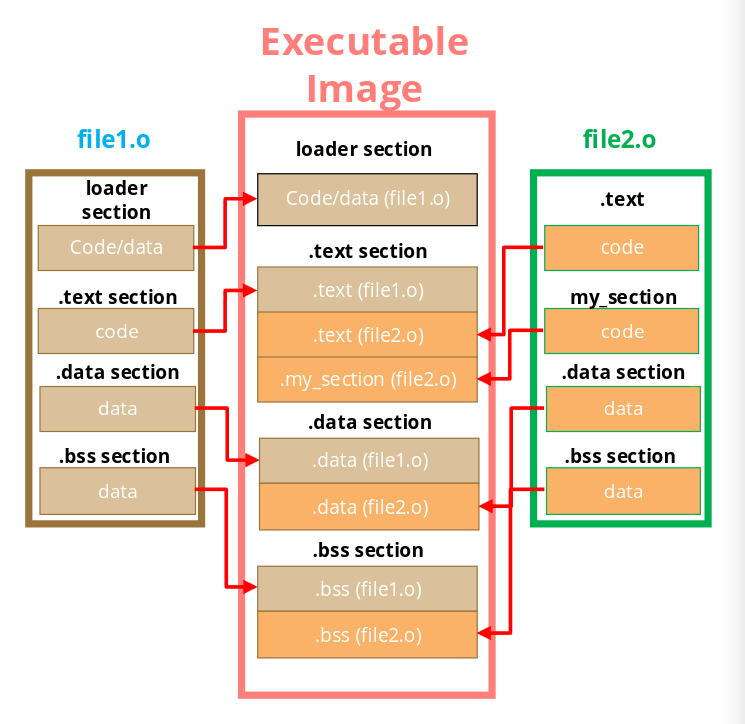
SECTIONS {
  /* The .text and my_section are combined into the final .text. */
  .text : {
    my_section
    *(.text)
  }

  /* Loader section is placed into flash memory. */
  loader : > FLASH

  /* .data and .bss are grouped and aligned in contiguous physical RAM. */
  GROUP ALIGN (4) : {
    .data : {}
    .bss : {}
  } > RAM
}
Processors and I/O
Section titled “Processors and I/O”Other than the CPU, we have many other peripherals like timers, UART or sensors. The processor reaches on-chip peripherals through the bus matrix, and external interfaces connect off-chip devices to the bus.
Each peripheral exposes registers that the CPU can read and write. Later we will also see how interrupt lines report events from I/O devices that need to wake up the CPU.
Data registers carry values moving in and out of the device. The access direction depends on the peripheral. Status and control registers are used to expose event statuses or to configure operating modes.
The registers can be accessed through specialized I/O instructions (used in x86) or with memory-mapped I/O (used in ARM) through load/store operations on predefined ranges of the memory address space.
Accessing registers in C
Section titled “Accessing registers in C”C uses pointers to refer to registers. The volatile keyword tells the compiler to treat the variable as a black box, disabling optimizations that could break the program.
#include <stdint.h>

#define DEV1_STATUS_ADDR 0x40001000u
#define DEV1_STATUS(*(volatile uint32_t *)DEV1_STATUS_ADDR)

uint32_t status = DEV1_STATUS;
DEV1_STATUS = 8u;
Another technique is to wrap access to the register with read/write functions:
#define DEV1_STATUS_ADDR 0x40001000u

uint32_t read(uint32_t *location) {
    return *location;
}

void write(uint32_t *location, uint32_t newval) {
    (*location) = newval;
}

uint32_t status = read((uint32_t *)DEV1_STATUS_ADDR); /* read device register */
write((uint32_t *)DEV1_STATUS_ADDR, 8); /* write 8 to device register */
Polling I/O
Section titled “Polling I/O”I/O devices are typically slower than the CPU. The processor can adopt a couple of strategies to check for the completion of the operation.
Busy wait consists of continuously reading the device status registers until completion is signaled. The loop is easy to implement and has low complexity, but CPU cycles are wasted doing useless work.
#define OUT_CHAR (*(volatile uint8_t *)0x1000) /* output device character register */
#define OUT_STATUS (*(volatile uint8_t *)0x1001) /* output device status register */

while (*current != 0) {
    OUT_CHAR = *current;
    OUT_STATUS = START;

    while (OUT_STATUS != DONE) {
        // CPU waits here
    }

    current++;
}
Interrupt-driven I/O
Section titled “Interrupt-driven I/O”A more efficient mechanism is the use of interrupts that allow a device to request CPU time only when a relevant event occurs.
When an interrupt is received, the processor saves the current context, runs the handler, and then resumes the interrupted program.
An interrupt is a request from the device to the CPU, which can choose to accept the request with an acknowledge signal.
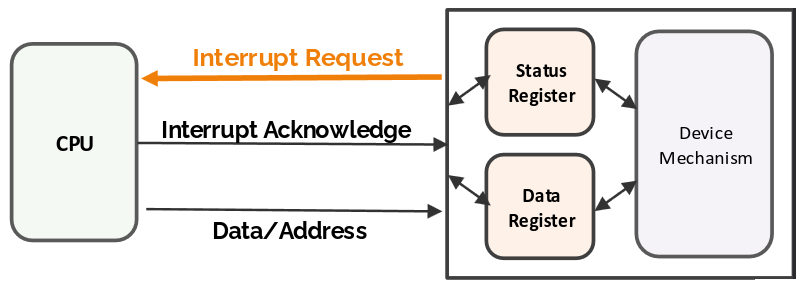
Once an interrupt is accepted, the processor starts executing from the address pointed to by the associated entry in the interrupt vector table.
/* get a character and put in global (called when IN_STATUS is 1) */
void input_handler() {
    achar = read(IN_DATA); /* get character */
    gotchar = TRUE; /* signal to main program */
    write(IN_STATUS,0); /* reset status to initiate next transfer */
}

/* react to character being sent (called when OUT_STATUS is 0) */
void output_handler() {
    /* don't have to do anything */
}

void main() {
    while (TRUE) { /* read then write forever */
        if (gotchar) { /* write a character */
            write(OUT_DATA,achar); /* put character in device */
            write(OUT_STATUS,1); /* set status to initiate write */
            gotchar = FALSE; /* reset flag */
        }
    }
}