Mass storage and I/O subsystem architecture
Mass storage
Section titled “Mass storage”The bulk of secondary storage on modern computers is hard disk drives (HDD) and non-volatile memory (NVM) devices.
Host-attached storage is accessed through I/O ports, connected via I/O buses such as:
- Advanced Technology Attachment (ATA), Serial ATA (SATA) and eSATA;
- Serial Attached SCSI (SAS);
- Universal Serial Bus (USB);
- Fibre Channel (FC);
- Non-Volatile Memory Express (NVMe);
Storage stack
Section titled “Storage stack”A physical disk stores data in sectors. This is the smallest unit the hardware can read/write (usually 4 KB).
Each sector contains data, metadata, and error correction code (ECC).
Modern disks don’t expose their physical layout directly; instead, they provide a linear address space using Logical Block Addressing (LBA).
Before storing files, the OS divides the disk into partitions defined in a table (MBR (legacy) or GPT). Each partition is a contiguous range of LBAs.
Each partition acts like an independent disk that can hold a separate filesystem. The filesystem (FS) turns raw storage into usable files and directories.
Scheduling
Section titled “Scheduling”The OS is responsible for using the hardware efficiently. It must minimize delay and maximize bandwidth.
In HDDs, it is essential to prevent fragmentation, due to the large amount of time needed to move the magnetic head. In SSDs this problem has become less relevant.
Many sources (OS, system processes, user processes) generate I/O requests. Each one specifies the operation (read/write), disk address (logical), memory address, and the number of sectors to transfer.
I/O requests are not always executed in the order they arrive. Reordering them can improve performance and reduce latency. Both the OS and the device’s firmware may perform reordering.
I/O systems
Section titled “I/O systems”The vast majority of I/O devices share two common characteristics:
- a physical port that connects the device to the computer;
- a communication infrastructure, called bus;
Some typically used communication protocols are:
- PCI (Peripheral Component Interconnect): common parallel expansion bus (legacy);
- SCSI (Small Computer System Interface): common parallel disk interface (legacy and enterprise);
- PCIe (PCI Express): high-speed serial expansion bus;
- SATA (Serial Advanced Technology Attachment): modern interface for storage devices;
- USB (Universal Serial Bus): versatile serial bus interface;
I/O devices can be grouped by the OS into:
block I/O:
- typically disk drives;
- syscalls are
read,write,seek; - support memory mapping and direct memory access;
character I/O:
- syscalls are
get,put; - libraries layered on top allow line editing;
- syscalls are
- memory-mapped file access;
- network sockets;
The controller (or host adapter) is the hardware component that manages communication between the CPU and the I/O device. It acts as the interface that connects the I/O device to the system bus.
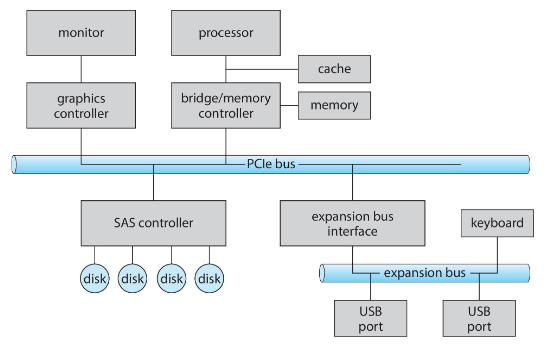
The device driver is the software layer in the OS kernel that interacts with the controller. It translates high-level OS commands into low-level device-specific commands. It also handles interrupts, buffering and device-specific optimizations.
To keep track of all the devices and their concurrent requests, the OS keeps a device-status table that stores:
- device type;
- device address;
- device state (not functioning, idle, busy);
- request type and parameters;
- wait queue;