Process lifecycle and context switching
Process states
Section titled “Process states”As a process executes, it changes state:
- new: the process has been created;
- ready: the process is waiting to be assigned to a processor;
- running: instructions are currently being executed;
- waiting: the process is waiting for an event to occur;
- terminated: the process has finished execution;
Process control block
Section titled “Process control block”The PCB is an in-memory data structure that stores all the essential information about a process, so the OS can manage and switch between processes.
Information typically stored includes:
- process ID (PID);
- parent process ID (PPID);
- user and group IDs;
- state;
- program counter;
- register values;
- stack pointer;
- scheduling information (priority, CPU usage, execution time);
- memory management information (page table pointer, heap and stack info for dynamic allocations);
- file management information (open files, sockets, pipes, working directory);
Other process information
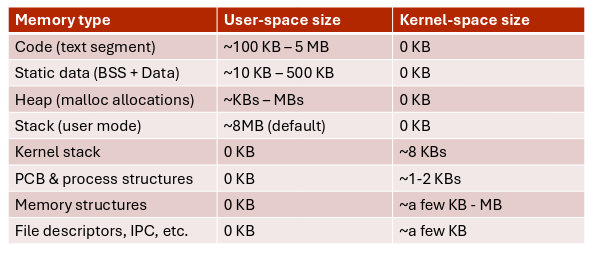
Section titled “Other process information”There are other structures kept in memory by the kernel:
- kernel stack: used when system calls or interrupts require execution in kernel mode;
- memory management structures: page tables, VMA records, …;
- file descriptors, IPC structures, scheduling data and networking information referenced by the PCB;
Context switch
Section titled “Context switch”When the CPU switches to another process, the system must save the state of the old process and load the one saved for the new process.
The context of a process is represented in the PCB.
Context switching is time ‘wasted’ because no process can execute except the kernel. The more complicated the kernel and the PCB are, the more time it takes to switch contexts.
Threads
Section titled “Threads”So far we have considered processes with a single flow of execution.
To execute multiple tasks in parallel within a single program, we need to create multiple threads.
Each thread has an independent program counter, stack, and set of registers. The PCB must support storing all this data. The extension of the PCB used to store thread-specific information is called Thread Control Block (TCB).
Scheduling
Section titled “Scheduling”Objectives:
- maximize CPU utilization through time-sharing;
- minimize CPU idle time by deferring execution of processes still waiting for I/O or other blocking events;
The OS maintains scheduling queues of processes:
- job queue (unused in modern OSes): set of all processes in the system;
- ready queue: set of all processes ready and waiting to execute;
- device queues: set of processes waiting for an I/O device;
Queues are usually implemented as linked lists, where the PCB itself stores a next pointer to the process scheduled to run immediately after the current one.
The OS stores only pointers to the head and tail of each queue.
Process creation and termination
Section titled “Process creation and termination”A process is always created by a parent process, forming a tree. Parent and child processes can choose to share or not share certain resources.
To create a new process, the parent calls fork(). This function creates a new process that is an identical copy of the parent. To load and execute a different program, the child process calls exec() with the executable name and arguments.
Processes can exit autonomously by calling the exit() system call. This signals to the kernel that it can clean up resources.
The parent can call wait() to wait for the child process to terminate; the function returns the child’s exit status. If the parent doesn’t call wait(), the OS retains the PCB in memory, and the child process becomes a zombie process.
If the parent terminates before calling wait(), the child becomes an orphan process. On Linux, systemd periodically reaps orphans by calling wait() on them, allowing them to terminate and clean up.
A parent can forcefully terminate child processes using the kill() syscall.
UNIX-like OSes terminate all the child processes when the parent terminates.