File systems, directories, and memory-mapped files
A file can be seen as a contiguous logical address space. To the user it appears as a linear array of bytes, while the OS abstracts the physical properties of the underlying storage.
A file is the smallest unit of allotment of logical secondary storage. Data cannot be written to disk unless it is stored in a file.
Each file has a name known to the user, but also a low-level name that for historical reasons is referred to as inode.
File name extensions (the part after ‘.’) are conventionally used to influence the OS behaviour when operating on the file. There is no enforcement that the data contained in a file with a particular extension is actually valid data for that file type.
File attributes
Section titled “File attributes”The OS must store the following information about files:
- name: only human readable information;
- identifier: like the inode number;
- type: for UNIX systems a file could be a data file, a socket or also a device;
- location: pointer to the location on device;
- size: size of the file;
- protection: read, write, execute bits;
- timestamps: created at, updated at, etc.;
- user identification: owner and group information;
This metadata is stored in the directory structure on the disk.
File operations
Section titled “File operations”- Create: the OS must find space in the filesystem and a new entry for the file is made in the directory.
- Open: all operations except create and delete require a file to be opened first. The OS must search the directory structure for the inode and return a handle that can be used as an argument in other calls.
- Write: the user must specify the file handle and data to write. The OS keeps a pointer to the location where the next write shall take place.
- Read: the user must specify the file handle and the location in memory where to put the read data. The OS keeps a pointer (the same as the write one) to the location where the next read shall take place.
- Seek: reposition the read/write pointer within the file. No I/O is involved.
- Truncate: erase the contents of the file but keep its attributes.
- Close: move the content of the file entry from memory to disk.
- Delete: the directory entry is removed.
Open files
Section titled “Open files”File operations involve searching the directory for an entry associated with the named file. The open-file table is used to replace the expensive search with a simple index operation.
The implementation of the open-file table is more complex in scenarios where multiple apps can open files simultaneously. Typically, there are two levels of internal tables:
- Per-process table: tracks all the files a process has open and the position of the read/write pointer.
- System-wide table: tracks file location, size, access dates, etc. It’s pointed to by the entries of the per-process table.
File locking
Section titled “File locking”Some OSes provide locking functionality for file access. The lock can be shared (multiple processes can acquire it concurrently) or exclusive (one process at a time).
The lock can also be mandatory, where access is denied if locked, or advisory, where the other processes can obtain the status of the lock and decide what to do.
Reading and writing files
Section titled “Reading and writing files”- Sequential access: this is the simplest method. The supported operations are
read next,write nextandreset(the pointer to the beginning of the file). There is no seek operation. - Direct access: this gives the ability to access any part of a file independently. Supported operations are
read at n,write at n, orseek n + read/write next. - Indexed access: at the application level, we may want to create index maps where the key leads to known locations in the file. This avoids the need to search for the required offset.
Directories
Section titled “Directories”Directories are a collection of inodes. Operations commonly supported are search file, create file, delete file, list contents, rename file, traverse the file system to parent or sub-directories.
Directory organization
Section titled “Directory organization”The directory must be organized logically for performance (efficiency in locating files), usability (repeatable names, special characters, etc.) and access control.
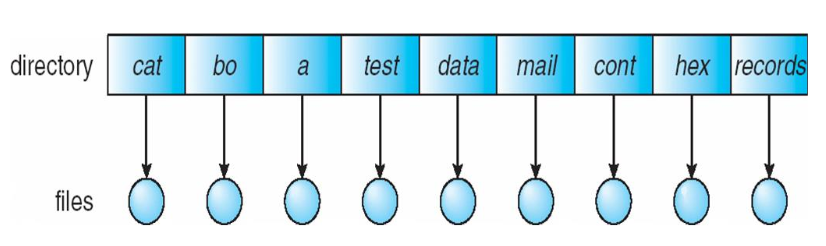
Single level directory: all files are contained in the same directory. There are issues when a large number of files is present or there is more than one user.
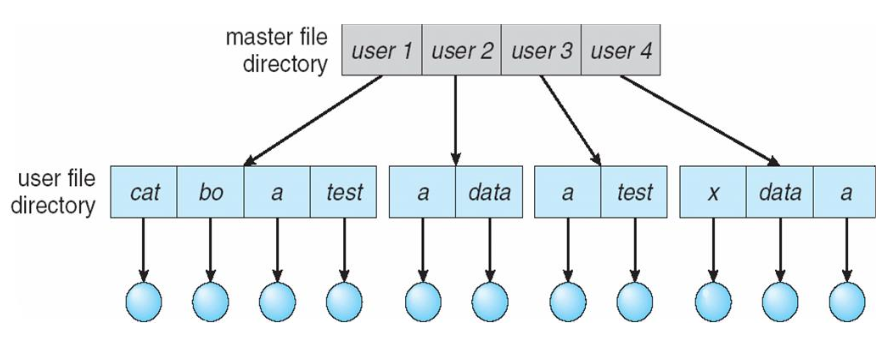
Two-level directory: the system is divided into separate directories for each user (User File Directory) and the underlying Master File Directory.
File names can be repeated across users but they still can’t be logically grouped. The UFDs are managed by the sysadmin who also manages the users.
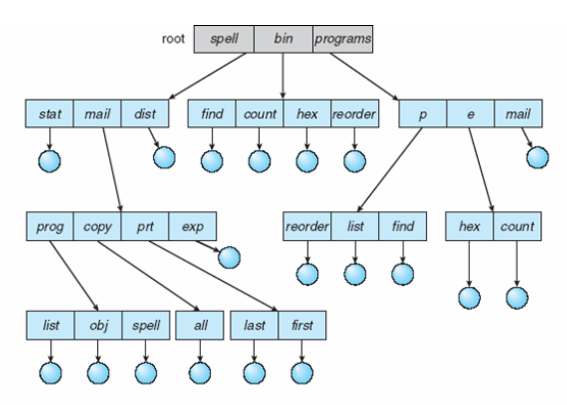
Tree-structured directory: this is a generalization of the 2-level tree to arbitrary heights. Users can create subdirectories and organise files accordingly.
Every file has a unique path name. A file can be referenced with an absolute or relative path. File operations with relative paths are resolved starting from the current working directory.
The OS assumes that the current directory contains most of the files of interest for the process, so when a file is referenced the current directory is searched first. Searching for arbitrary files requires accessing the filesystem multiple times, making the operation inefficient.
To delete a directory it is necessary to empty it first.
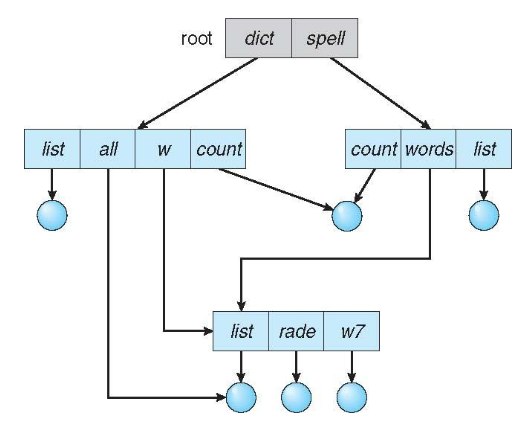
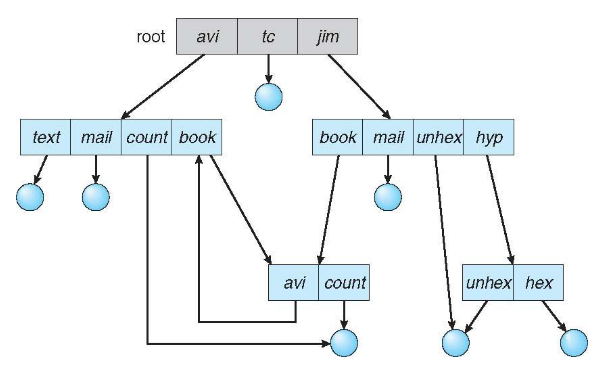
Acyclic-graph directory: this structure allows to have shared subdirectories and files with different path names.
A shared file is not the same as two copies. Changes made through one reference are also visible through the other.
- Hard link: it’s another name for the same inode. Deleting one name doesn’t delete the file until all references are gone. It cannot span across filesystems. Cannot point to directories or it could create cycles in the graph.
- Symbolic link: it’s a separate file (inode) that stores a path to another file. This works across filesystems, can point to directories and even to non-existent targets.
General-graph directory: this is a generalization of acyclic graphs. Care must be taken when creating links since cycles in the filesystem could lead to infinite loops when traversing it.
Protection
Section titled “Protection”It shouldn’t be possible to modify, read, or write other users’ files without their consent.
The owner of a file should be able to control who can operate on the file and the operations they can perform (read, write, execute, append, delete, list).
Access control lists (ACL): per-user ACLs allow setting specific rules for who can access each file/directory. Their flexibility allows implementing complex access methodologies, but their storage means that directory entries must be of variable length.
A simpler access system found on UNIX systems is composed of owner permissions, group permissions, and other users’ permissions.
Memory-mapped files
Section titled “Memory-mapped files”Instead of accessing files via read/write syscalls, files can be mapped into a process’s virtual address space.
This allows for transparent access and reduced system call overhead, especially for files larger than RAM.
Writes are made to memory pages and written back to disk lazily.
- Shared mapping (MAP_SHARED): makes changes visible to other processes and writes them back to the file.
- Private mapping (MAP_PRIVATE): enables copy-on-write, syncing changes only when the process closes the file descriptor.